
Your Black Friday collection is the page that gathers every deal in one place. Shoppers who search for a category during the sale often land on a collection page, not a single product. If that page is missing from Google, or it has a vague title and no content, the traffic goes to a competitor.
This guide shows how to build a Black Friday collection page that search engines can understand. You will learn how to pick keywords, set URLs, write titles and content, link to the page, and decide what to do with it once the sale ends.
Quick answer: How should you optimize a Black Friday collection page? Map one category keyword to the page, use a clean URL, write a title and meta description that name the category and the offer, add 80 to 150 words of useful content, link to the page from your menu and homepage, and check that it is indexed before the sale.
Why Collection Pages Matter for Black Friday SEO
A collection page can rank for a category term such as “women’s running shoes.” One collection page can also hold dozens of sale products, so each product benefits from the page’s visibility. Product pages alone rarely match that reach.
Black Friday also brings a short search window. Shoppers look for deals a few days before and during the sale. A collection page that is indexed early has time to earn impressions. A page created on November 26 may not.
Collection pages also gather internal links from your menu and homepage. That makes them one of the best places to send authority during a promotion. For broader category-page best practices, see Shopify’s guide to ecommerce category page SEO.
How to Choose Keywords for BFCM Collections
Pick one main keyword for each Black Friday collection. Pair it with a product category and a sale intent word, so the page answers a clear search.
Product category plus Black Friday intent
Start with the category your shoppers already search for, such as “running shoes” or “trail backpacks.” Then add intent words that match a sale search, such as “deals,” “sale,” or “Black Friday.” Use these as a guide, and check that real shoppers use them in your Search Console data and in Google’s autocomplete.
Do not force “Black Friday” into every keyword. Many shoppers search for the category first and the deal second. A page titled only “Black Friday Sale” may struggle to match a category query.
For stores managing multiple collections, keyword research tools can help compare opportunities before assigning a main term to each page. SearchPie includes keyword research and rank tracking, along with page audits to help check keyword placement in titles and headings. Use these insights to refine your keyword map while keeping each collection focused on a distinct search intent.
For more guidance on assigning keywords and optimizing Shopify collection pages, see Secomapp’s Shopify SEO optimization guide.
Keyword mapping examples
| Collection | Main keyword | Supporting terms |
| Black Friday Running Shoes | running shoes sale | women’s running shoes deals, lightweight running shoes |
| Black Friday Trail Packs | trail backpack deals | 30L hiking backpack sale, waterproof trail pack |
| Cyber Monday Home Decor | home decor sale | modern wall art deals, throw pillow sale |
Keep one collection per main keyword. If two collections target the same term, Google may pick one and ignore the other. Merge them or make the search intent clearly different.
How to Structure Black Friday Collection URLs
The URL tells both Google and shoppers what the page is. Set it before you publish, because changing it later can break links and rankings.
Evergreen vs seasonal URLs
An evergreen URL stays the same every year, such as /collections/black-friday-running-shoes. A seasonal URL includes the year, such as /collections/black-friday-running-shoes-2026.
We suggest a hybrid approach. Use a stable URL for the category, such as /collections/running-shoes, and create a separate sale collection with a seasonal name only when the sale has its own product set. Evergreen URLs keep links and authority building over time. Seasonal URLs fit one-off events with a clear end date.
Keep the URL short, with the main keyword and no extra words. Use hyphens, and use lowercase letters.
Avoid unnecessary URL changes
If a Black Friday collection already exists and has earned links, do not change its handle. Edit the title, description, and products instead. If you must change the URL, set up a 301 redirect from the old address to the new one. Secomapp explains how to create URL redirects for Shopify stores.
If you need to manage many outdated collection URLs, SearchPie supports bulk 301 redirects to help merchants redirect broken or outdated URLs to relevant, active pages. Before applying a redirect, confirm that the destination matches the original page’s content and search intent.
Optimize Collection Titles, Meta Descriptions and Content
The collection title becomes the H1 on the page. The SEO title and meta description control what appears in search results. Give each one a job.
Before and after examples
| Element | Before | After |
| Collection title (H1) | “BF Deals” | “Black Friday Running Shoes” |
| SEO title | “Collection | Store” |
| Meta description | (auto-generated) | “Shop running shoes on Black Friday with up to 30% off. Men’s and women’s styles, free returns, ships in 2 days.” |
| Intro text | “Check out our sale.” | “Save on running shoes this Black Friday. Compare cushioned, lightweight, and trail styles in one place, all with the sale price shown.” |
Keep the SEO title under 60 characters, with the category keyword near the front. Do not put a discount percentage in the SEO title, because the offer may end. Keep the meta description between 120 and 155 characters.
Write 80 to 150 words of content
Add a short description above the product grid, with the main keyword in the first sentence. Say what the collection includes, who it is for, and what the offer covers. Mention any exclusions, such as gift cards or clearance items, so shoppers are not surprised at checkout.
Shopify lets you add this text in the collection description field. Check how your theme displays it, so the text appears near the top of the page.
Improve Internal Linking to BFCM Collections
Google finds collection pages through links. A sale page that only appears in the menu for a few days may not be crawled quickly.
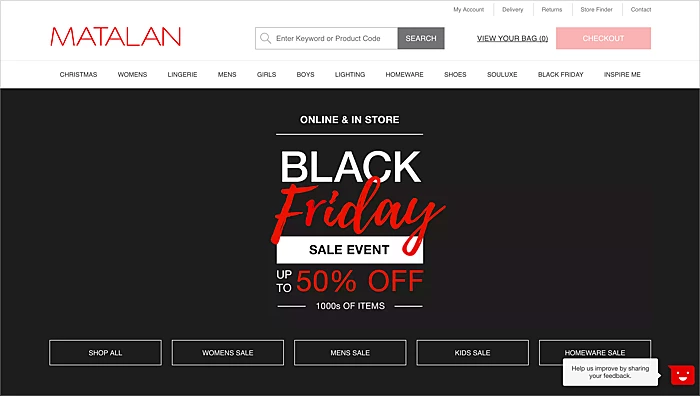
Link the Black Friday collection from your homepage banner and main menu. Link it from related blog posts, buying guides, and category pages. Use anchor text that names the destination, such as “Black Friday running shoe deals” rather than “click here”.
Link back from sale products to their collection, so the page receives links from many product pages. Check for orphan collections with no internal links, and fix them before the sale begins.
Indexing and Canonical Checks
Before the sale, test the collection in Google Search Console. Paste the URL into URL Inspection and check whether it is on Google. If it is not, look for the reason in the page details.
Check for these common blockers:
- A noindex tag left over from a draft or a theme setting
- A robots.txt rule that blocks /collections/
- A canonical tag that points to another page
- Duplicate content from very similar collections
Request indexing for the collection after you fix any blocker. Requesting indexing signals that a page is ready, but Google decides when to index it, so publish early and check again a few days later.
What to Do With BFCM Collection Pages After the Sale
Should you create a new Shopify Black Friday collection every year? It depends on whether the URL has earned links and traffic. If the category stays the same, keep the stable URL and update the products and content each year. If the sale has a unique product set and a different name each year, a new seasonal collection makes sense.
Once the sale ends, avoid deleting the page. Instead, do one of these:
- Replace the banner with a message such as “Black Friday has ended, shop our latest deals”
- Remove the sale labels and show the regular prices
- Keep the category content and link it to the regular category page
- Redirect a seasonal URL to the matching evergreen category if the page has no value on its own
Deleting a page with links or traffic creates 404 errors. Redirect it, or keep it live.
How Can SearchPie Help With Your Black Friday Collection Pages?
SearchPie is an all-in-one Shopify SEO and speed platform by PieLab. It holds the Built for Shopify badge and a 4.9 rating from more than 2,440 merchant reviews. These three features matter most for collection pages.
Technical SEO and indexing. SearchPie checks whether a collection URL is indexed, connects to Google Search Console for sitemap submission and automatic indexing requests on new collections, and supports IndexNow for Bing and Yandex. It flags duplicate meta titles and multiple H1 headings, which often come from theme conflicts. Orphan page detection finds collections with no internal links, and custom internal links let you connect them with chosen anchor text. Noindex controls keep low-value tag pages out of the index, so the sale collection gets the attention. Premium and Enterprise add automatic redirects when an old seasonal URL breaks.
Schema. Collection pages need structured data that matches the products on the page. SearchPie adds Collection schema on the Premium plan, along with Product schema for price, stock, and reviews. Enterprise unlocks all six schema types. Breadcrumb schema from the free plan also helps Google read the path from homepage to collection to product.
Image SEO. Collection pages load many product images at once, so image weight affects speed. SearchPie compresses JPG and JPEG images in bulk and processes new uploads automatically, with a Restore option if you need the originals. It also writes ALT text for collection and product images using templates or AI-generated descriptions.
Additionally, AI content generation writes or rewrites collection descriptions and meta titles in several languages. Keyword tools and rank tracking help you check whether the target keyword appears in titles and headings. AI search readiness structures product data for ChatGPT Search, Perplexity, and Google AI Overviews. Speed optimization adds lazy loading and link preloading, and the backlink community and Google Merchant Center integration support the wider campaign.
Which plan fits whom: Starter suits new or small stores running a single sale collection. Premium suits growing stores with several category collections and seasonal sales. Enterprise suits large catalogs with many collections and teams that want the monthly SEO roadmap.
Black Friday Collection SEO Checklist
Keywords and URL
- One main keyword is mapped to the collection
- URL is short, uses hyphens, and has no unnecessary changes
- No other collection targets the same main keyword
Titles and content
- H1 names the category clearly
- SEO title is under 60 characters with the keyword near the front
- Meta description is 120 to 155 characters
- 80 to 150 words of content sit above the product grid
- Exclusions are stated
Links and indexing
- Collection is linked from the menu and homepage
- Related products and blog posts link back to the collection
- URL Inspection shows the page is on Google
- No noindex tag, robots.txt block, or wrong canonical
After the sale
- Sale banner and labels are removed or replaced
- Page is kept, or redirected if it is seasonal and has no value on its own
FAQs
Should I create a new Shopify Black Friday collection every year?
Not always. Keep a stable category URL and update its products and content each year. Create a new seasonal collection only when the sale has its own product set and a clear end date.
How do I optimize Black Friday collection pages?
Map one category keyword to the page, use a clean URL, write an SEO title and meta description that name the category and the offer, add 80 to 150 words of content, link the page from your menu and homepage, and confirm it is indexed.
Can I change the URL of a Black Friday collection that is already live?
You can, but only if you set up a 301 redirect from the old URL. If the page has no links or traffic yet, changing it is lower risk.
Does a Black Friday collection need a discount in the title?
No. Put the offer in the meta description and the page content. A discount in the title can become outdated when the sale ends.
How soon should the collection go live?
Publish it early enough for Google to crawl and index it before the sale. Check the status a few days after publishing, and fix any blockers you find.
Conclusion
A Black Friday collection page works when Google can find it, shoppers understand the category, and the page is ready for the sale. Choose one main keyword, set a clean URL, write clear titles and content, and link the page from your menu. After the sale, keep or redirect the page instead of deleting it. If this guide helped, share it with your team and tell us in the comments how you handled your last sale collection.